

好久好久以前,wordpress的留言似乎(我已經忘了)可以自動寄信通知管理者要審核,回覆留言也會寄信通知留言者你的留言有人回覆你了,現在新版的wordpress似乎已經沒有這個功能,所以我想把它加回來
先參考了網路的文章 找到在2013年發表的外掛 Comment Reply by Admins Notifier,載點 發現竟然還可以用勒~
先到上面我貼的載點去下載外掛檔案,依照Wordpress的外掛安裝方式放在/wp-content/plugins/ 目錄下,comment-reply-by-admins-notifier這個目錄下面有一個 comment-reply-by-admins-notifier.php檔案,請打開編輯它(編輯是因為要符合咱台灣人繁體中文的閱讀),所以自己加工了一下,最後經過一連串的測試,證實是可以使用的。 請看下面
comment-reply-by-admins-notifier.php 原本的程式碼
<?php
/*
Plugin Name: Comment Reply by Admins Notifier
Plugin URI: http://www.yakuphoca.com/comment-reply-by-admins-notifier-plugin/
Description: When you reply a comment as Admin or Editor, an E-mail will send a notify to commenter.
Version: 2.0
Author: Yakup Hoca
Author URI: http://www.yakuphoca.com
License: GPL2
*/
// don’t load directly
if (!function_exists(‘add_action’)) {
header(‘Status: 403 Forbidden’);
header(‘HTTP/1.1 403 Forbidden’);
exit();
}
add_action(‘comment_post’, ‘yh_comment_reply_by_admins_notifier’);
function yh_comment_reply_by_admins_notifier($comment_id)
{
$comment = get_comment($comment_id);
if( $comment->comment_parent != 0 )
{
if( current_user_can( ‘moderate_comments’ ) )
{
$current_user = wp_get_current_user();
if ( ($current_user->user_email == $comment->comment_author_email) )
{
$parent_comment = get_comment($comment->comment_parent);
if($parent_comment->user_id != $current_user->ID)
{
$email = $parent_comment->comment_author_email;
$adminname = $current_user->display_name;
$post = get_post($comment->comment_post_ID);
$posttitle = esc_attr($post->post_title);
$postlink = get_permalink($comment->comment_post_ID);
$commentlink = get_comment_link($comment_id);
$blogname = wp_specialchars_decode(get_option(‘blogname’), ENT_QUOTES);
$subject = sprintf(‘Your Comment was Replied – %1$s’, $blogname);
$notify_message = sprintf(‘%1$s (Admin of %2$s) replied to a comment you left on:’, $adminname, $blogname ) . ‘<br />’;
$notify_message .= sprintf( ‘<a href=”%1$s”>%2$s</a>’, $postlink, $posttitle ) . “<br /><br />”;
$notify_message .= ‘You can check admin\’s comment here: ‘ . “<br />”;
$notify_message .= ‘<a href=”‘ . $commentlink . ‘”>’ . $commentlink . ‘</a><br /><br /><br />’;
$notify_message .= ‘This e-mail was sent by <a href=”‘ . get_home_url() . ‘”>’ . $blogname . ‘</a><br />’;
$notify_message .= ‘If the comment isn\’t belong to you, never mind about this e-mail.’ . “<br />”;
$message_headers = “Content-Type: text/html; charset=\”” . get_option(‘blog_charset’) . “\”\n”;
wp_mail( $email, $subject, $notify_message, $message_headers );
}
}
}
}
}
?>
然後我把它加入的翻譯與修改了一下 (看倌可以自行比對,或是直接複製修改)
<?php
/*
Plugin Name: Comment Reply by Admins Notifier
Plugin URI: http://www.yakuphoca.com/comment-reply-by-admins-notifier-plugin/
Description: When you reply a comment as Admin or Editor, an E-mail will send a notify to commenter.
Version: 2.0
Author: Yakup Hoca
Author URI: http://www.yakuphoca.com
License: GPL2
*/
// don’t load directly
if (!function_exists(‘add_action’)) {
header(‘Status: 403 Forbidden’);
header(‘HTTP/1.1 403 Forbidden’);
exit();
}
add_action(‘comment_post’, ‘yh_comment_reply_by_admins_notifier’);
function yh_comment_reply_by_admins_notifier($comment_id)
{
$comment = get_comment($comment_id);
if( $comment->comment_parent != 0 )
{
if( current_user_can( ‘moderate_comments’ ) )
{
$current_user = wp_get_current_user();
if ( ($current_user->user_email == $comment->comment_author_email) )
{
$parent_comment = get_comment($comment->comment_parent);
if($parent_comment->user_id != $current_user->ID)
{
$email = $parent_comment->comment_author_email;
$adminname = $current_user->display_name;
$post = get_post($comment->comment_post_ID);
$posttitle = esc_attr($post->post_title);
$postlink = get_permalink($comment->comment_post_ID);
$commentlink = get_comment_link($comment_id);
$blogname = wp_specialchars_decode(get_option(‘blogname’), ENT_QUOTES);
$subject = sprintf(‘你的留言已經有人回應你了,在%1$s的部落格’, $blogname);
$notify_message = sprintf(‘%1$s已經在%2$s的部落格文章主題中回應你的留言,文章如下網址:’, $adminname, $blogname ) . ‘<br />’;
$notify_message .= sprintf( ‘<a href=”%1$s”>%2$s</a>’, $postlink, $posttitle ) . “<br /><br />”;
$notify_message .= ‘你也可以直接點選下面這個網址直達你的留言處: ‘ . “<br />”;
$notify_message .= ‘<a href=”‘ . $commentlink . ‘”>’ . $commentlink . ‘</a><br /><br /><br />’;
$notify_message .= ‘這個E-Mail的出處是 <a href=”‘ . get_home_url() . ‘”>’ . $blogname . ‘</a><br />’;
$notify_message .= ‘如果你沒有在任天堂的部落格留言過請忽略並刪除此E-Mail’ . “<br />”;
$message_headers = “Content-Type: text/html; charset=\”” . get_option(‘blog_charset’) . “\”\n”;
wp_mail( $email, $subject, $notify_message, $message_headers );
}
}
}
}
}
?>
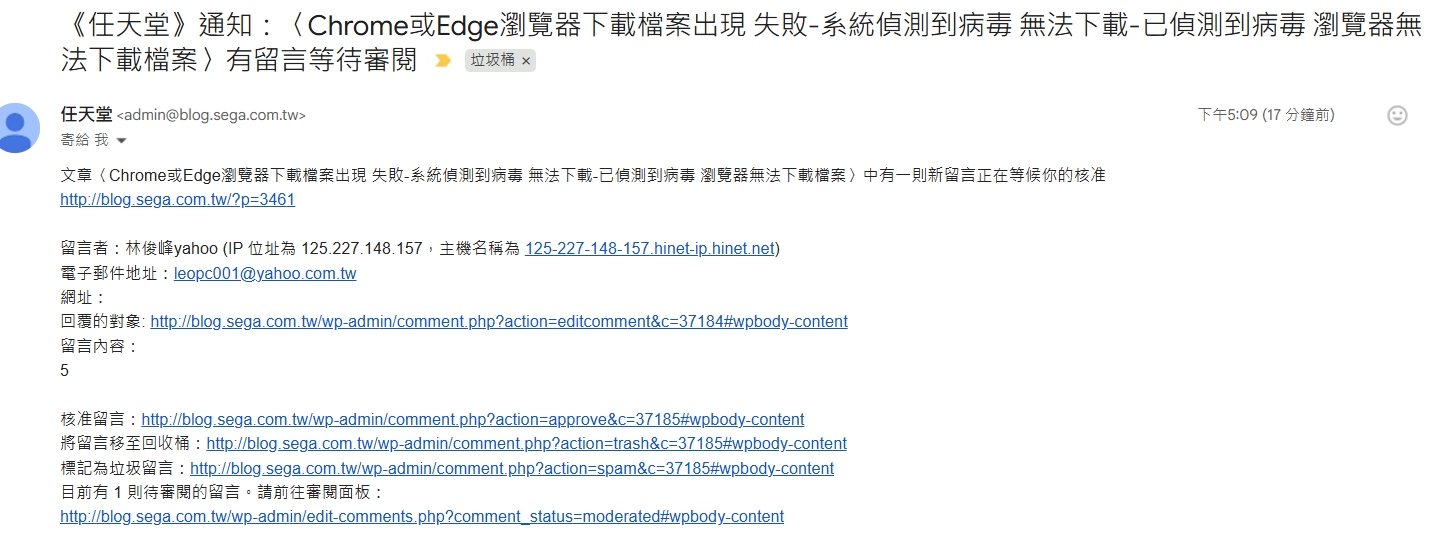
修改好之後,我想辦法讓這個管理員回覆留言的機制觸發一下,然後寄出來的信如下圖
還有這個
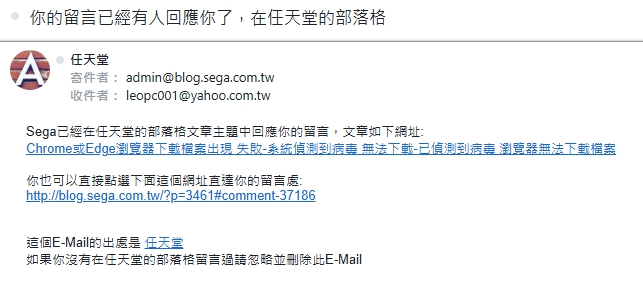
這樣一來Blog管理員回覆留言,留言者就會收到email通知,是不是很好用很方便?
謝謝您的閱讀
如果對我寫的文章內容有任何問題,歡迎在底下留言讓我知道
我是任天堂543亂亂寫的Sega
Leave a Reply